Local keyword targeting is essential for businesses aiming to attract nearby customers. It helps you rank higher in local searches like "best café near me" or "plumber in Andheri", driving immediate actions like calls or store visits. With 76% of local searches leading to a visit within a day and 88% resulting in a call or visit within 24 hours, this strategy can significantly boost visibility and engagement.
Here are the key steps:
- Research Local Keywords: Use tools like Google Keyword Planner, Google Trends, and Ubersuggest to find city or neighbourhood-specific keywords (e.g., "plumber in Bandra"). Include both explicit (e.g., "dentist in South Delhi") and implicit keywords (e.g., "dentist near me").
- Optimise On-Page Elements: Add local keywords to title tags, meta descriptions, headers, and URLs. For example, use "Affordable Gym in Powai" in your H1.
- Create Location-Specific Content: Build landing pages or blogs tailored to each area, focusing on local challenges or interests (e.g., "Monsoon Plumbing Tips for Mumbai").
- Use Schema Markup: Implement LocalBusiness schema to provide search engines with structured data like your address, hours, and geo-coordinates.
- Maintain NAP Consistency: Ensure your Name, Address, and Phone number are identical across your website, Google Business Profile, and directories.
- Encourage Reviews: Positive reviews can improve rankings. Respond to both positive and negative feedback to build trust.
- Optimise for Mobile and Voice Search: Ensure your website loads quickly, is mobile-friendly, and accommodates conversational queries like "Where can I find the best vegan food near me?"
How to Research Local Keywords
To uncover local keywords, start by analysing actual search queries. Did you know that 80% of consumers go online multiple times a week to find local businesses? That’s a huge opportunity to connect with nearby customers [6].
A good place to begin is with Google Keyword Planner, which is free for anyone with a Google Ads account [10]. Make sure to set the location filter to your specific service area, like Mumbai or a particular neighbourhood. This way, you’ll get data on search volumes specific to your area rather than broad national figures. For example, if you’re researching for an Indian business, you might see bid estimates in rupees (e.g., ₹10 for "Clothing store"), which can help you budget effectively [10].
Another helpful tool is Google Trends, which shows regional differences and seasonal patterns. A term that’s popular in Maharashtra might not even register in Tamil Nadu, and some services may experience seasonal spikes. You can also use Google Autocomplete by typing your service along with "in [City]" to get live suggestions [8].
For deeper insights, tools like Semrush‘s Keyword Magic Tool allow you to target India and filter results with city-specific modifiers [3]. Meanwhile, Ubersuggest offers a free way to discover long-tail keywords and check what competitors are ranking for [6]. Don’t dismiss keywords with "0" search volume if they clearly reflect local intent – smaller towns or niche services might not show high search numbers but can still be valuable [8].
"Local keyword research is the process of finding keywords that people use when searching for products, services, or amenities in their areas – and they reveal what potential customers are searching for."
- Rachel Handley, Senior Content Writer, Semrush [3]
Once you’ve gathered your keywords, refine them by adding location-specific terms.
Adding Location Terms to Keywords
Using location modifiers in your keywords makes your local intent clear to search engines. Instead of competing on a national scale for a term like "plumber", focus on phrases like "plumber in Andheri" or "emergency plumber near Gateway of India." These types of keywords are more likely to trigger the Local Pack at the top of search results [3].
There are two types of local keywords to consider: explicit keywords that include a location (e.g., "dentist in South Delhi") and implicit keywords that rely on proximity (e.g., "dentist near me") [3].
For Indian businesses, effective patterns often follow simple formulas like:
- [Service] in [City/Area]
- Best [Service] in [City/Area]
- [Service] near [Landmark]
Think "best gym in Powai" or "bakery near MG Road." Don’t stop at city names – target specific neighbourhoods like Bandra, Indiranagar, or Koramangala, where your customers are likely to live or work [8] [13].
To cover different search intents, use modifiers such as:
- Quality terms: "best", "top-rated"
- Occasion terms: "emergency", "24-hour"
- Type terms: "residential", "commercial"
- Special offerings: "affordable", "quick"
For example, a fully optimised keyword might look like: "affordable emergency plumber in Bandra."
Also, keep local terminology in mind. Many Indians search using terms like "kirana store" instead of "grocery store" or "metro" instead of "subway" [8].
Finding Keywords That Show Buying Intent
Once you’ve added location modifiers, focus on keywords that signal a readiness to buy. These are transactional keywords, in contrast to informational ones. For instance, "plumber near me open now" clearly indicates immediate intent. Prioritise keywords that suggest action, such as "buy", "book", "hire", or "get", along with urgency terms like "emergency", "open now", or "same day" [8] [9].
The phrase "near me" is particularly powerful. Searches like "who has + in stock" have surged by over 8,000% year over year, and local searches including "near me" have grown by more than 80% annually [9].
Voice search is another factor to consider – 76% of people use it weekly to find local businesses [6]. Instead of a basic query like "vegan restaurant Mumbai", voice searches might sound more conversational, such as "Where can I find the best vegan food near me?" [8].
Customer reviews can also reveal high-intent keywords. If you notice recurring phrases like "home delivery" or "taco truck", these could be worth targeting [8] [11]. Before finalising any keyword, search for it yourself to ensure it triggers local business results or a Map Pack – this step confirms that the keyword has genuine local intent [2] [12].
Adding Local Keywords to On-Page Elements
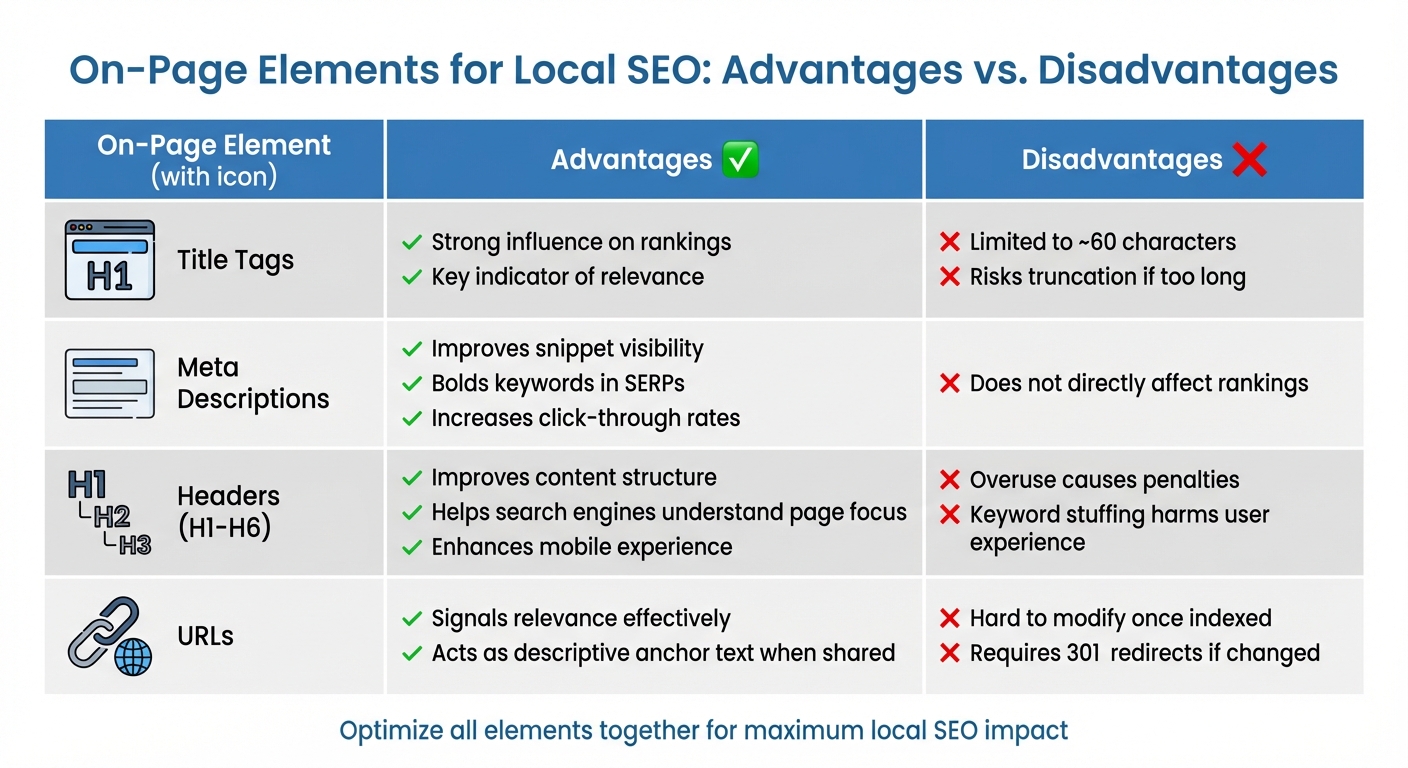
Comparison of On-Page SEO Elements for Local Keyword Optimization
After identifying your local keywords, the next step is to strategically place them in key on-page elements to signal relevance to search engines. This process ensures your website aligns with local search intent, improving its visibility. Title tags, meta descriptions, headers, and URLs are the main areas where these keywords can make a noticeable impact. Here’s how you can optimise each of these elements with your local keywords.
Title Tags are arguably the most important on-page element for SEO. They serve as clickable headlines in search results and play a crucial role in rankings [15][16]. To maximise their effectiveness, position your primary local keyword near the beginning. For instance, instead of writing "Quality Dental Services | Dr. Sharma’s Clinic | South Delhi", opt for "South Delhi Dentist | Dr. Sharma’s Clinic | Quality Dental Care." Keep your title tags under 60 characters to ensure both the location and service are visible [15].
Meta Descriptions don’t directly influence rankings but act as ad copy in search results. When they include a searcher’s query, Google highlights the keywords, making your listing more noticeable [14][15]. Write engaging meta descriptions that incorporate your location and a call to action. For example: "Looking for emergency plumbing in Bandra? Available 24/7. Call now for same-day service."
"The primary goal of a meta description should be to earn the searcher’s click. Think of them like ad copy, and work to make searchers care about your page."
Headers (H1-H6) help organise your content and signal its relevance. Your H1 should align with the search intent and reinforce the location mentioned in your title tag. For example, if someone searches "affordable gym in Powai", your H1 could be "Affordable Gym Memberships in Powai." Make sure your H1 is prominent and immediately visible [2]. Use subheaders (H2, H3) to divide content into readable sections, naturally including secondary local keywords. However, avoid overloading headers with keywords, as this can harm both user experience and rankings [14][15].
URLs also serve as relevancy signals for both users and search engines. A descriptive URL like example.com/locations/emergency-plumber-bandra clearly indicates the page’s purpose [14][15]. Use hyphens to separate words, keep URLs concise (under 75 characters), and avoid unnecessary filler words like "and" or "the" [18]. Since URLs are challenging to change once indexed, ensure they are optimised correctly from the start to avoid needing 301 redirects [15].
Comparing Different On-Page Elements
Each of these on-page elements has its strengths and limitations. Here’s a comparison:
| On-Page Element | Advantages | Disadvantages |
|---|---|---|
| Title Tags | Strong influence on rankings; key indicator of relevance [14][15] | Limited to about 60 characters; risks being truncated if too long [15] |
| Meta Descriptions | Improves snippet visibility; bolds keywords in SERPs; increases click-through rates [14][15] | Does not directly affect search engine rankings [14] |
| Headers (H1-H6) | Improves content structure and readability; helps search engines understand the page’s focus; enhances mobile experience [15][17] | Overuse or keyword stuffing can lead to penalties or poor user experience [14][15] |
| URLs | Signals relevance effectively; acts as descriptive anchor text when shared [14] | Hard to modify once indexed without implementing 301 redirects [15] |
Creating Content for Specific Locations
Once you’ve fine-tuned your on-page elements, the next step is to craft content that resonates with each specific location. Avoid the temptation to copy-paste content across multiple areas. Instead, focus on creating unique, location-specific material that ties seamlessly into your on-page strategies. This approach not only strengthens your regional relevance but also connects with local audiences on a deeper level.
Location-specific landing pages are a powerful tool when they showcase local details. If your business operates multiple branches, consider creating customised landing pages that include essential information like store addresses, staff introductions, and maps. For service-based businesses without physical offices in every city – like plumbers or electricians – city-specific pages can highlight local projects and address regional challenges. For instance, a plumber might discuss monsoon-related plumbing issues in Mumbai, while focusing on hard water concerns in Delhi.
In addition to landing pages, local blogs and guides can significantly boost your presence in the community. Writing about region-specific problems your customers face helps establish what experts call "geo-topical authority." For example, a security company could analyse crime trends in specific neighbourhoods, while a home maintenance service might explore how Chennai’s coastal humidity impacts paint durability compared to Rajasthan’s dry heat. Sharing content that reflects your community involvement also builds trust. Research shows that 92% of consumers read online reviews, with 84% trusting them as much as personal recommendations [19].
"Content for local searchers is hard to fake and hard to make ‘great’… you can’t go the classic route of building a single page of content and simply replacing the geographic keywords with each city you’re targeting."
- Rand Fishkin, Founder, Moz [20]
Hyper-local guides are another effective way to attract an audience still in the research phase. Create content about local attractions, parks, landmarks, and curated "best-of" lists for your area. For example, a restaurant could feature nearby tourist spots, while a real estate agent might develop neighbourhood guides covering schools, markets, and transport options. These guides not only provide value but also position your business as a trusted local expert.
Using Schema Markup and Keeping NAP Consistent
Once you’ve created location-specific content, the next step is to implement local business schema markup and ensure your NAP (Name, Address, Phone Number) details remain consistent across all platforms. Schema markup is a type of structured code that helps search engines better understand your business – what you offer, where you’re located, and other key details. This technical step complements your earlier on-page efforts, giving your local search visibility an extra boost.
Using local business schema, particularly in JSON-LD format, tells search engines exactly what they need to know about your business. While schema markup doesn’t directly improve rankings, it enhances the relevance of your pages for specific search terms [22]. It also increases the likelihood of appearing in the Local Pack and enables rich search results, such as star ratings or price ranges, to appear directly in search results [23][2]. Considering that 76% of people who perform a "near me" search visit a related business within 24 hours [2], this added visibility can make a huge difference.
When adding schema, choose the most specific business type available. For instance, instead of using the generic LocalBusiness tag, opt for options like Restaurant, Dentist, or Store [21][23]. Include detailed information such as geo-coordinates, opening hours, and a complete address. Once implemented, test your schema with Google’s Rich Results Test to ensure everything is set up correctly [21][23].
"Local Business Schema is a digital handshake between your business and search engines" – Ankit Thakkar, Group Head at Infidigit [23]
Equally important is maintaining NAP consistency. Your NAP acts as your business’s digital fingerprint, helping search engines verify your identity across the web [24]. When your business name, address, and phone number are consistent across your website, Google Business Profile, and third-party directories, search engines trust your information more. On the other hand, inconsistencies – like using "Pvt. Ltd." in one place and "Private Limited" in another, or listing an outdated phone number – can confuse search algorithms and hurt your rankings [23][25]. With nearly half (46%) of all Google searches having local intent [25], keeping this information accurate is non-negotiable.
One crucial tip? Always ensure your NAP is in crawlable HTML text rather than embedded in images. Search engines can’t read text within images, so placing critical details in an image format could make your business harder to find [22][24].
Creating Local Listings and Getting Customer Reviews
After fine-tuning your on-page elements and ensuring a consistent NAP (Name, Address, Phone Number), the next step in your local SEO journey is to focus on local listings and customer reviews. These two elements are essential for improving your visibility in local searches. Start by claiming and optimising your business profiles on popular directories. In India, key platforms include Google Business Profile, Justdial, and Sulekha. While Justdial and Sulekha offer free basic listings, they also provide paid premium plans that come with additional lead-generation features [26][2][27].
When creating your profiles, it’s important to choose the most specific primary category that reflects your business. For instance, if you operate a credit union, opt for "Federal Credit Union" as your category rather than a more generic option like "ATM" [28][29]. Craft a unique, keyword-rich description of 150–300 words for each platform, but steer clear of promotional language or adding links in your Google Business Profile description [26][28]. High-quality visuals are equally important – upload clear images of your business’s interior, exterior, and products. Before uploading, rename your image files with relevant keywords (e.g., "digital-marketing-kolkata.jpg") to further optimise your profile [26][27]. Businesses with complete and well-maintained profiles are 70% more likely to attract visits from local customers [34].
Why Customer Reviews Matter
Customer reviews are more than just feedback – they’re a critical factor in improving your local search rankings. Google considers reviews as a key "prominence" signal, directly influencing how your business appears in local search results [31]. Reviews also play a significant role in consumer decision-making. Around 90% of people read reviews when looking for nearby services, and nearly all consumers (99%) check online reviews when researching local businesses [2][31]. A steady flow of fresh reviews doesn’t just improve rankings; it can also boost click-through rates. For example, increasing your average rating from 3 stars to 5 stars can lead to a 25% rise in clicks [31].
Encouraging reviews requires a thoughtful approach. Train your staff to ask for reviews during face-to-face interactions, especially when customers are happy with their experience [30][31]. QR codes on receipts or signage can make it easy for customers to leave a review by directing them straight to the form [30][2][16]. You can also automate follow-ups using CRM or POS systems to send review requests via email or SMS shortly after a transaction [31][32]. However, avoid "review gating" – only asking satisfied customers for reviews – as it violates Google’s guidelines and could result in your profile being suspended [30]. Additionally, offering incentives like money, gifts, or discounts in exchange for reviews is strictly against the rules of most platforms [30][16].
Managing and Responding to Reviews
Engaging with reviews is just as important as collecting them. A whopping 92% of consumers appreciate businesses that respond to reviews, and more than half (53%) expect a reply to negative reviews within a week [2][32]. For positive reviews, a simple thank-you goes a long way. For negative ones, respond professionally – acknowledge the issue, express your willingness to resolve it, and take the conversation offline if needed [30][33][2].
"Ignoring reviews results in a failure to serve and engage with your existing consumer base, win back customers who have left negative reviews, and benefit from the business intelligence gained when review sentiment is analysed." – Miriam Ellis, Local Search Scientist at Moz [2]
sbb-itb-3716372
Preparing for Mobile, Voice Search, and ‘Near Me’ Searches
In India, where around 900 million internet users primarily rely on smartphones, mobile-first indexing is now the key factor influencing your rankings [1][7]. For local businesses, this shift is especially important. Did you know that 76% of people performing a "near me" search visit a related business within 24 hours? Even more impressive, 28% of these searches lead to a purchase [2][16]. If your website isn’t mobile-friendly or takes too long to load, you could be missing out on customers who are ready to take action.
Speed is Everything. Your site should load in under 3 seconds – any delay beyond that risks losing potential visitors [36]. To achieve this, compress images, enable lazy loading, and use tools like caching plugins or a CDN. Don’t forget to optimise for Core Web Vitals. Pay close attention to metrics like Largest Contentful Paint (LCP) for faster loading and Cumulative Layout Shift (CLS) to minimise annoying page jumps. Plus, ensure all buttons and call-to-action elements are easy to use on mobile screens [38][7]. Once your site is running smoothly on mobile, it’s time to focus on conversational search trends.
Voice search is reshaping how customers find local services. About 76% of people use voice search weekly to discover nearby businesses [6], and "near me" searches have surged by over 200% in the past two years [40]. Voice queries tend to be longer and more conversational, such as, "Where can I buy fresh flowers in Pune?" To capture this traffic, optimise your site with question-based headers and FAQ sections that reflect natural speech patterns [40]. Incorporating long-tail keywords like "best café near me open now" or "where can I find a plumber in Noida" can make a big difference [41]. Pairing voice search optimisation with local keyword targeting will boost your visibility in regional searches.
"Voice search is just an easier way of searching for something using long-tail keywords!" – Mitali Purkait Ghosh, Co-Founder, Digital Concepts [35]
To complement these efforts, keep your business profile data accurate and up to date. A complete Google Business Profile is essential since AI and voice assistants depend on it for "best [service] near me" queries [2]. Embed a Google Map on your "Contact Us" page and use LocalBusiness schema markup to include precise geo-coordinates, business hours, and contact details [2]. If your business operates in multiple cities like Mumbai, Delhi, or Bangalore, consider creating separate landing pages for each location. This approach helps you rank better for "service + city" keywords [7][39].
Measuring and Improving Local Keyword Results
Tracking how your local keywords perform is essential, and you can start right away. Google Search Console (GSC) helps you monitor how your site appears for local searches, while Google Analytics 4 (GA4) provides insights into user behaviour once they land on your site – like filling out forms or clicking the "Call Now" button[42][11][37].
To dig deeper, filter your GSC data by specific location pages (e.g., Mumbai, Pune, Bangalore) to identify which local keywords are driving impressions and clicks. Pay attention to the difference between explicit keywords (e.g., "plumber in Noida") and implicit keywords (e.g., "plumber"), as each type performs differently[3][12]. This segmentation is key to tracking conversions effectively.
Take it a step further by adding UTM tracking parameters to the "Website" and "Appointment" links in your Google Business Profile. This allows GA4 to separate traffic from your local listing from general organic search traffic[43][37]. Additionally, configure GA4 to track local actions like call clicks, direction requests, and form submissions. If you notice high impressions but a low click-through rate (CTR), consider updating your meta titles and descriptions with local modifiers and monitor the changes in CTR over time[11].
The importance of localisation is clear, as Moz explains:
"Localization is the greatest form of personalisation Google applies to their SERPs, filtering entries so searchers see information about entities that are nearest to them." – Moz[43]
Local rankings can fluctuate even within the same city. For instance, your business might rank in the top three for someone searching in Bandra but drop to position eight for a searcher in Andheri. To address this, use geo-grid tracking tools to simulate searches from various points across your service area. This helps uncover areas where your visibility is weaker[42][3]. For zones with lower rankings, focus on building local links and citations to improve your presence.
Regular monitoring and timely adjustments are crucial. By staying vigilant and adapting quickly, you can ensure your local SEO strategy keeps pace with the demands of your market.
Building Local SEO into Your Website with Greenmor
Integrating local SEO directly into your website is essential for making your business regionally relevant. For Indian small businesses, your website often serves as the first impression for potential customers, and it needs to be optimised for local searches. Greenmor offers web development services that incorporate local SEO from the ground up, eliminating the need for costly adjustments later.
One standout feature is customisable location pages. These pages highlight key local details such as your address, phone number, and specific services offered at each branch[45]. For example, if you own a salon with multiple locations, each branch can have its own page with unique content. This not only helps search engines identify your business for local queries but also ensures users find the most relevant information for their area[44][45]. With 46% of all Google searches focusing on local intent[46], these pages are crucial for attracting high-intent customers.
While earlier sections covered research and on-page optimisation, Greenmor takes it further by embedding these strategies at a technical level. Their SEO-ready templates come equipped with structured headers, clean URLs, and optimised meta tags, seamlessly incorporating local keywords into your website[44][2]. Features like embedded Google Maps ensure your geographic coordinates are clear, and their solution also simplifies maintaining NAP (Name, Address, Phone number) consistency across your site and business directories[45][4].
Greenmor also implements LocalBusiness schema, which communicates essential details like your operating hours and geo-coordinates directly to search engines[45]. This structured data can enhance your visibility through rich snippets and AI-generated summaries in search results.
Another key advantage of Greenmor’s services is their mobile-friendly design. With about 77% of India’s web traffic coming from mobile devices[5] and 88% of mobile searches for local businesses leading to a call or visit within 24 hours[46], having a fast-loading, smartphone-optimised website is non-negotiable. Whether someone is searching on a bustling Mumbai local train or scrolling at home, Greenmor ensures your site provides a smooth, engaging experience that encourages action. From responsive templates to advanced local SEO features, Greenmor helps create a website that not only attracts visitors but converts them into loyal customers.
Summary
Targeting local keywords is a game-changer for Indian businesses aiming to connect with high-intent customers nearby. Start by conducting detailed research that blends your core service terms with location-specific modifiers and intent-driven keywords. This approach lays the groundwork to attract searchers actively looking for what you offer in your area.
Once you’ve completed your research, weave those keywords naturally into your on-page elements. Use them strategically in title tags, meta descriptions, headers, and image alt text, all while keeping the content easy to read and engaging. For businesses serving multiple locations, create distinct content for each area – duplicating content across locations can harm both your rankings and user engagement. Don’t overlook consistency: your Name, Address, and Phone number (NAP) should be identical across your website, Google Business Profile, and all directory listings[2][16].
In addition to optimising on-page elements, focus on reviews and schema markups to strengthen your local presence. Reviews play a big role – 99% of consumers read them, and 92% consider owner responses a sign of quality[2]. Actively encourage feedback and respond thoughtfully to build trust. Use LocalBusiness structured data to help search engines and AI tools accurately showcase your business details in rich snippets or summaries.
With mobile searches often leading to immediate conversions[16], optimising your website for mobile devices is non-negotiable. Ensure your site loads quickly and looks flawless on smartphones, especially as voice search and conversational queries gain traction. Tools like Greenmor can simplify this process by embedding these local SEO essentials into your website’s core, saving you from expensive adjustments later.
To stay ahead, track how your business performs in neighbourhood-specific Map Pack rankings and refine your strategy based on data insights. By following these steps consistently, you’ll create a solid local SEO strategy that not only generates qualified leads but also helps you dominate your local market and turn searchers into loyal customers.
FAQs
How can I keep my business name, address, and phone (NAP) details consistent across platforms?
To keep your NAP (Name, Address, and Phone number) details consistent, it’s essential to maintain a single, centralised record of your business information. Always use the exact same format for your name, address, and phone number across all platforms – this includes directories, your website, and social media profiles. Make it a habit to regularly review these platforms and correct any discrepancies or outdated information.
You can also take it a step further by adding NAP schema markup to your website. This structured data helps search engines accurately interpret and present your business details, which can enhance your visibility in local search results. Consistency in your NAP not only strengthens your search engine credibility but also builds trust with potential customers.
What are the most effective tools for researching local keywords?
To dive into local keyword research, there are several tools that can make the process easier and more effective. Google Keyword Planner is a great starting point, offering insights into search volumes and trends. Pair that with Google Autocomplete, which provides real-time suggestions based on what users are actively searching for.
For more advanced features like competition analysis and keyword difficulty scores, tools like Ubersuggest, SEMrush, and Ahrefs Keyword Explorer are highly regarded. They provide deeper insights that can help refine your strategy.
If your focus is on local SEO, BrightLocal‘s keyword tool stands out. It’s designed specifically to uncover location-based terms, making it easier to connect with your local audience. Using these tools, you can pinpoint impactful keywords that resonate with your target market and boost your search rankings.
How does using schema markup improve local search rankings?
Schema markup plays a crucial role in helping search engines make sense of your business’s location-related details – think address, operating hours, contact numbers, and even map directions. By using this structured data, your business stands a better chance of showing up in local search results and map packs, making it far easier for nearby customers to discover you.
The best part? It doesn’t just boost your visibility – it can also lead to higher click-through rates by providing users with detailed and useful information right within the search results.